Services
- ・Service charges will be incurred once the vehicle dispatch is confirmed.
- ・The following services are available only when GO Pay is selected. They cannot be used with in-car payment.
- ・Service charges may vary depending on the area and time slot. Please check the GO App when you make an order.
- Reservation
- Priority Ticket
- Opitions
- Airport Flat Rate
- GO PREMIUM
- GO Reserve
Reservation
Reservation is a new service that evolves traditional booking using AI. Previously, the number of requests we could accept was limited due to manual management. By using AI-driven real-time supply and demand forecasting, we can now handle more than 10 times the previous volume of requests. By using this service, you can request a taxi at any time by specifying a desired date and time from 15 minutes to 7 days in advance.

- ・The arrival of the car may be delayed due to traffic conditions.
- ・We do not guarantee that the car will always arrive at the exact specified time
- ・In the following cases, it will be treated as a Cancel:
- (1) If the user does not appear within 5 minutes starting from either the specified time or the time the car arrived at the pickup location, whichever is later.
- (2) If the ride search for your next reservation begins while you are still on a ride, that reservation will be cancelled.
- (3) If multiple cancellations described in (1) occur, all Reservation requests will be cancelled.
When you want to call a taxi for a later time

It's a bit too early to request a taxi right now, but I want to call one in an hour." Have you ever felt this way? GO automatically secures a car at the time you set in advance. You can enjoy a smooth ride without the rush of ordering at last minutes.
When you can predict road congestion on the day of your ride
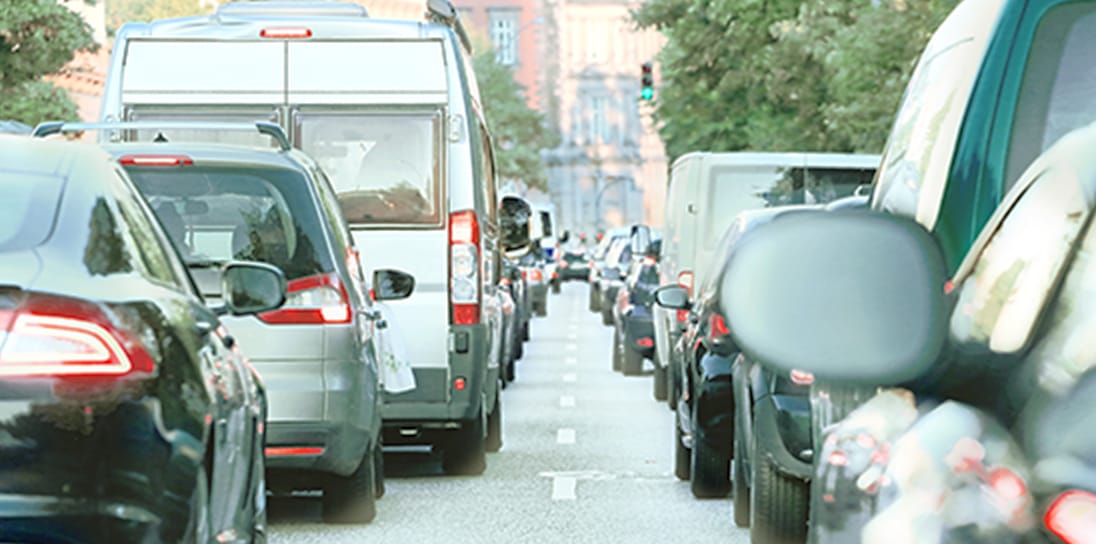
If you anticipate road congestion on the day or time you wish to ride, setting it in advance increases the probability of being able to board on time. Settings can be made up to 7 days in advance.
Usage Flow
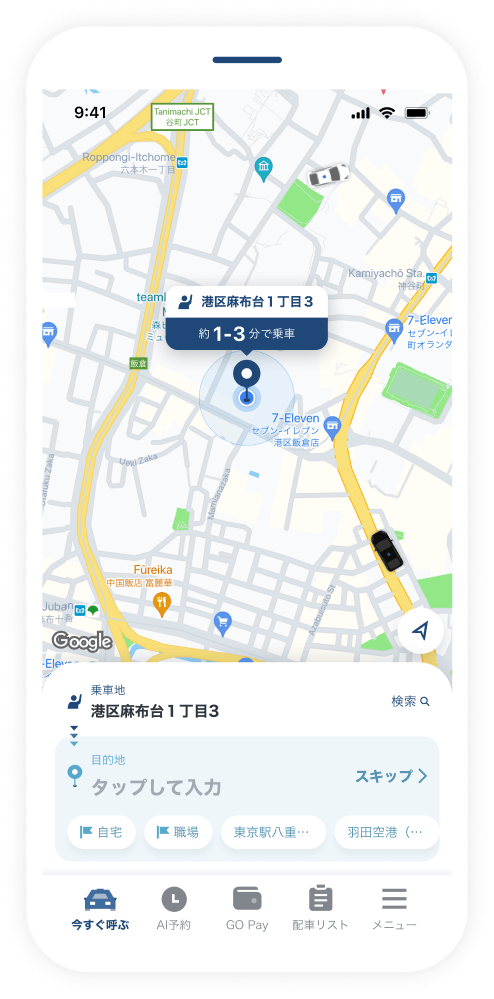
Tap the "Reservation" tab.
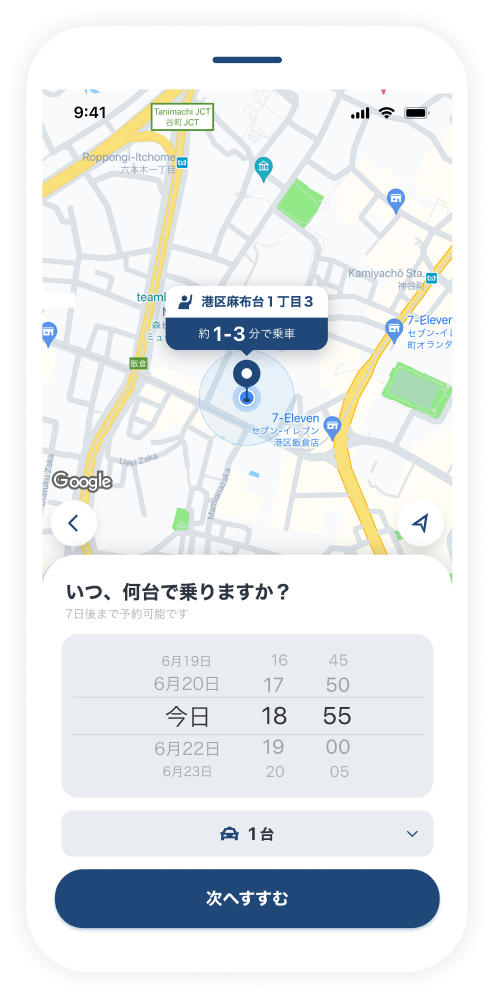
Specify the pickup time
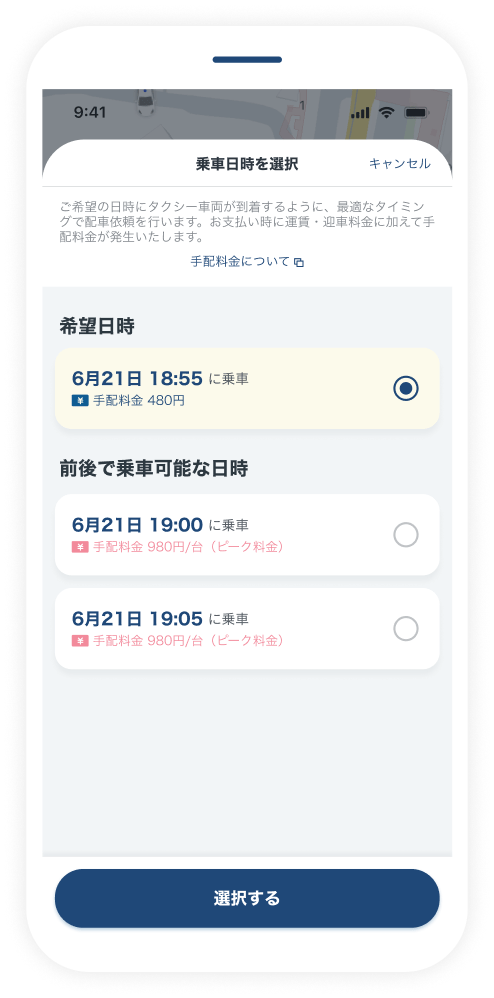
Check availability, select the pickup time, set the drop-off location, and apply.
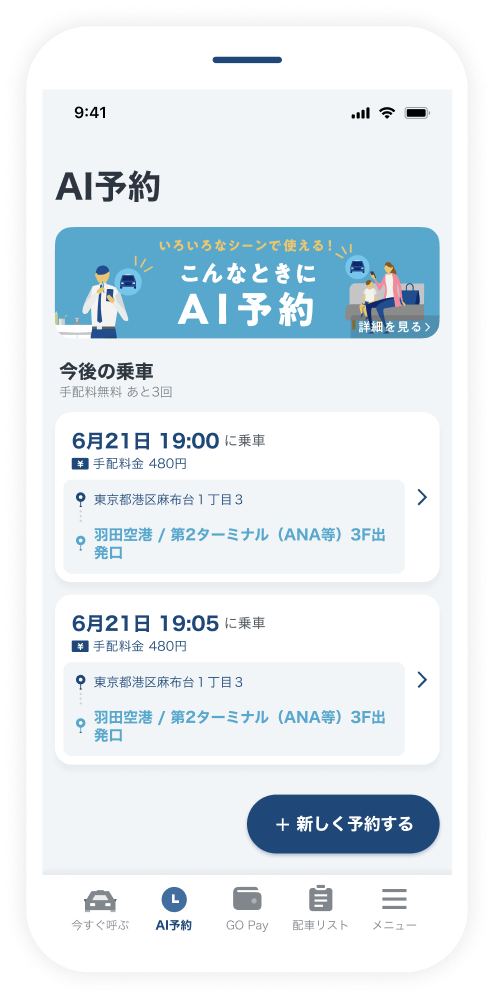
Once the application is complete, the request information will be displayed.
What is the difference from traditional booking?
Traditional taxi booking faced the challenge of not being able to accept enough orders because securing vehicles was difficult. In contrast, by using new Reservation function, the AI calculates the number of vehicles that can be arranged around the specified time to accept orders, allowing us to receive significantly more orders than before. By using this service, GO will automatically search for vacant vehicles on your behalf so that a car can be arranged around the set time.
Please note that this service does not guarantee a request or a vehicle at the exact specified time. There may be cases where the vehicle arrives later than the specified time or cannot be arranged.
Available Payment Methods
The service is only available when GO Pay is selected. It cannot be used with in-car payment.
Available Areas
Target areas are planned to expand sequentially. Please check here for details.
Usage Fees
In addition to the regular fare and pickup fee, a Reservation fee will be charged. Fees vary by area and time slot, so please check the GO App when applying.
FAQ
- Will the taxi always come at the specified time?
- Reservation is a service where GO automatically looks for vacant vehicles on your behalf so you can ride around your desired time. While we prioritize arranging a vehicle over regular orders, please understand that we may not be able to meet your request depending on the status of vacant vehicles and road conditions at that time. If the car arrives more than 5 minutes late from the desired time, the Reservation fee will not be charged. Also, due to road conditions, a vehicle on its way may be unable to reach you, resulting in an automatic Cancel. In such cases, a re-request will not be made automatically, so please operate the GO App yourself to perform a re-request.
- Can I use it with in-car payment?
- No. This is a service exclusive to GO Pay.
- Can I use a coupon?
- Please note that coupons apply only to the taxi fare and do not apply to the Reservation fee of this service.
- Why does the amount not match the meter fare?
- The taxi meter only displays the fare and fees, and does not include the Reservation fee for this service. Please check the final payment amount from the usage history in the GO App.
- Where should I inquire about using the service?
- For inquiries regarding this service, please contact us through the GO App. Please note that this service is provided by us, and taxi companies cannot answer any questions.
Please check here for details.
Priority Ticket
Peace of mind even during busy hours. As soon as a vacant vehicle is found, it will be automatically arranged.
Usage Flow
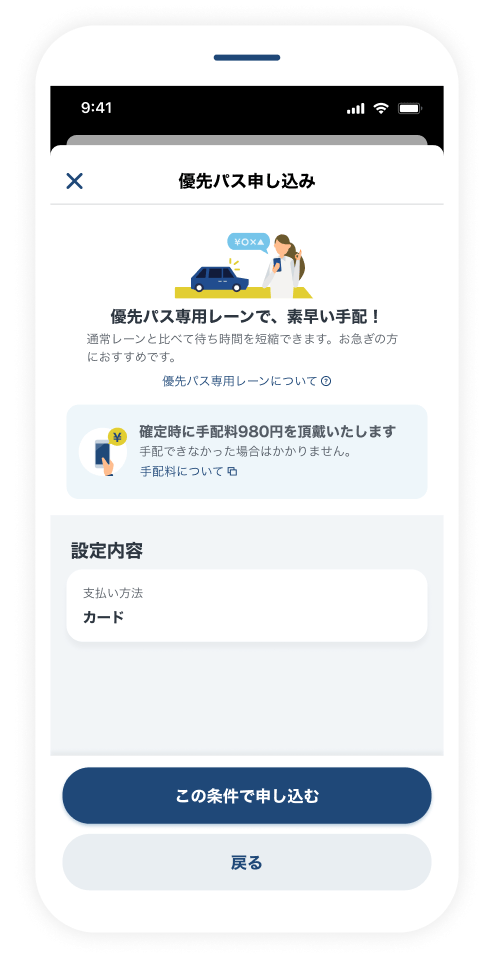
Usage Flow
Priority Ticket will be displayed during busy times.
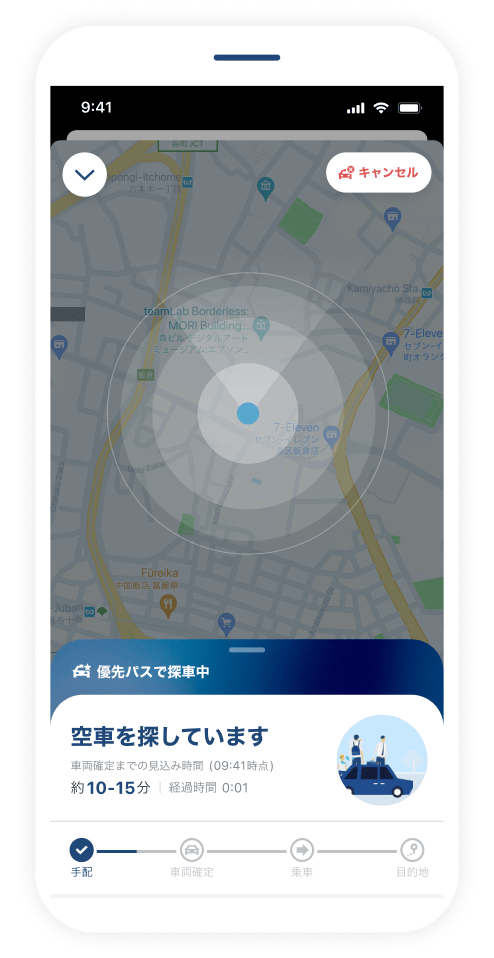
Please wait until the car is confirmed. GO will continue searching on your behalf until a vehicle is found.
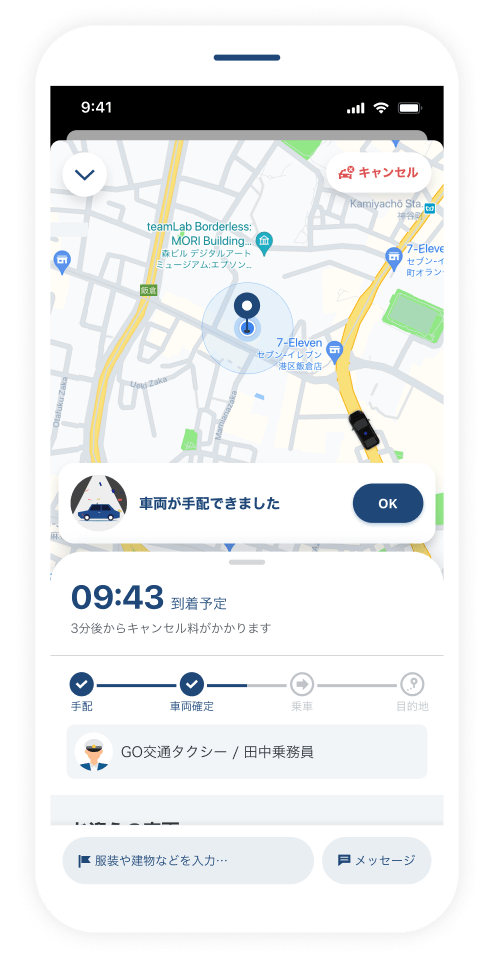
Once a car is arranged, you will receive a notification. Please check the expected arrival time.
Available Payment Methods The service is only available when GO Pay is selected. It cannot be used with in-car payment.
Available Areas
Available only in certain areas.
Usage Fees
In addition to the regular fare and pickup fee, a Priority Ticket fee will be charged. fees vary by area and time slot, so please check the GO App when applying.
FAQ
- Is a vehicle always arranged when using Priority Ticket?
- Priority Ticket is a service where GO automatically continues to search for a car on your behalf until a nearby vehicle becomes available. However, please understand that if a vehicle is not found for more than 30 minutes, it will be canceled automatically. No service charge will be charged if a vehicle could not be arranged.
- Can I use it with in-car payment?
- No. This is a service exclusive to GO Pay.
- Can I use a coupon?
- Please note that coupons apply only to the taxi fare and do not apply to the service charge for this service.
- Why does the amount not match the meter fare?
- The taxi meter only displays the fare and fees, and does not include the service charge for this service. Please check the final payment amount from the usage history in the GO App.
- Where should I inquire about using the service?
- For inquiries regarding this service, please contact us through the GO App. Please note that this service is provided by us, and taxi companies cannot answer any questions.
Please check here for details.
Opitions
We will arrange your specified vehicle, such as high-rated drivers, cars equipped with air purifiers, or JPN TAXI.
Usage Flow
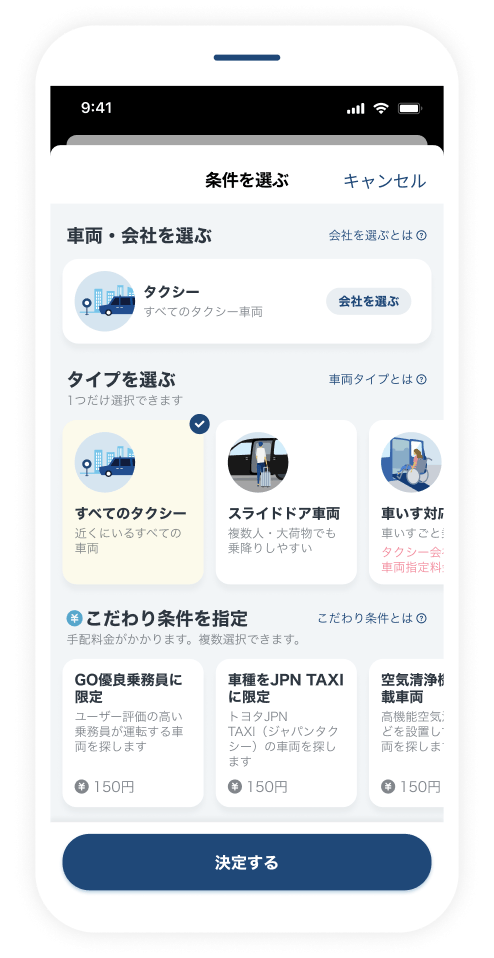
When using "Request now," select your preferred conditions from "Select Opitions."
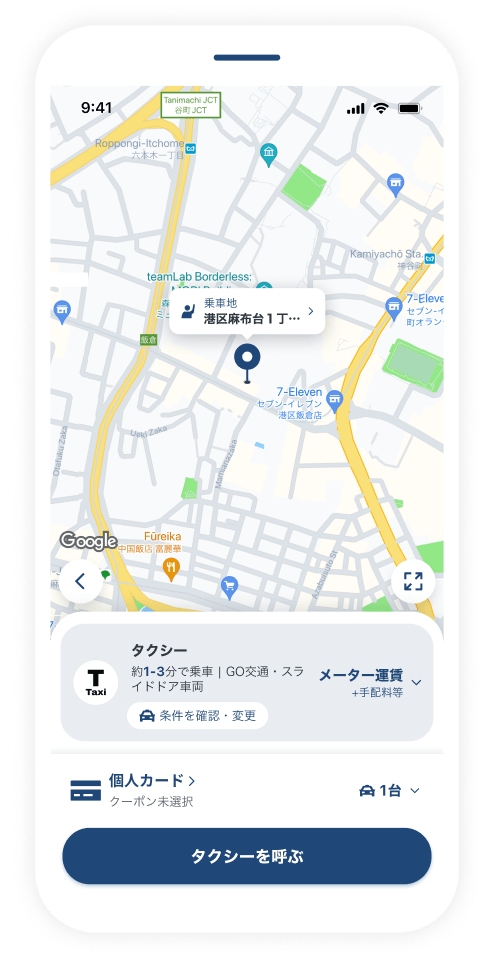
request a taxi after setting the conditions.
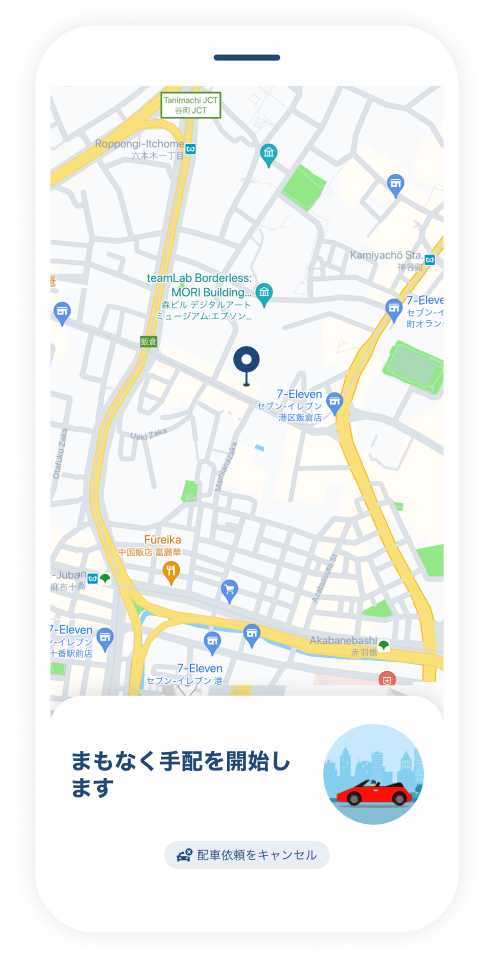
Once a car confirmed, check the expected arrival time.
What kind of Opitions are there?

High-rated drivers
You can call a driver who meets certain criteria, such as receiving high ratings from GO App users.

Cars equipped with air purifiers
You can call a vehicle equipped with a "high-performance filter (HEPA) air purifiers" or a "low-concentration ozone generator" effective against infectious diseases including COVID-19.
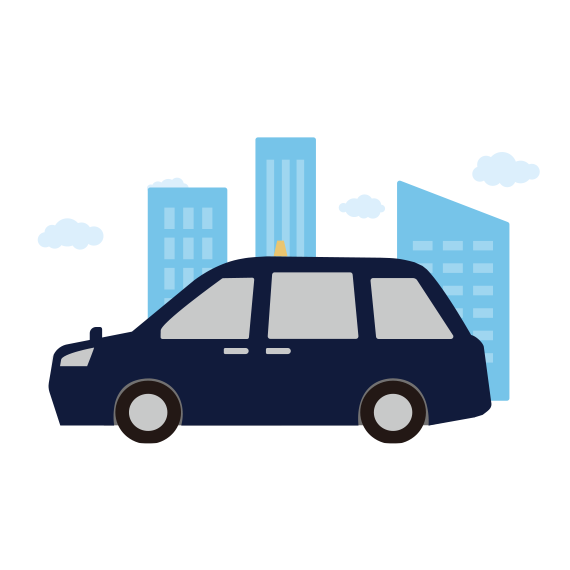
JPN TAXI
You can call a "JPN TAXI" vehicle, which has a wide doorway and is easy to get in and out of, even for multiple people or those with large luggages.
Available Payment Methods
The service is only available when GO Pay is selected. It cannot be used with in-car payment.
Available Areas
Available only in certain areas.
Usage Fees
In addition to the regular fare and pickup fee, a service charge applies. fees vary by area and time slot, so please check the GO App when applying.
FAQ
- Can I use it with in-car payment?
- No. This is a service exclusive to GO Pay.
- Can I use a coupon?
- Please note that coupons apply only to the taxi fare and do not apply to the service charge of this service.
- Why does the amount not match the meter fare?
- The taxi meter only displays the fare and fees, and does not include the service charge for this service. Please check the final payment amount from the usage history in the GO App.
- Where should I inquire about using the service?
- For inquiries regarding this service, please contact us through the GO App. Please note that this service is provided by us, and taxi companies cannot answer any questions.
Please check here for details.
Airport Flat Rate
This service offers flat-rate taxi fares between the airport and your designated location, such as your home, hotel, station, or travel destination. With GO, there is no need for advanced booking. You can use Airport Flat Rate even when you want to request a taxi right now. Starting with Tokyo – Haneda/Narita Airports (Tokyo – Narita is only for travel to the airport).

Edogawa, Taito, Sumida, Bunkyo, Chiyoda, Shinjuku, Shibuya, Adachi, Katsushika, Arakawa, Kita, Toshima, Nakano, Suginami, Setagaya, Itabashi, Nerima, Musashino City, Mitaka City
*Reservation cannot be used for travel from Haneda Airport to the Tokyo area.

Edogawa, Taito, Sumida, Bunkyo, Chiyoda, Shinjuku, Shibuya, Adachi, Katsushika, Arakawa, Kita, Toshima, Nakano, Suginami, Setagaya, Itabashi, Nerima, Chuo, Minato, Shinagawa, Meguro, Ota, Koto, Musashino City, Mitaka City
Usage Flow
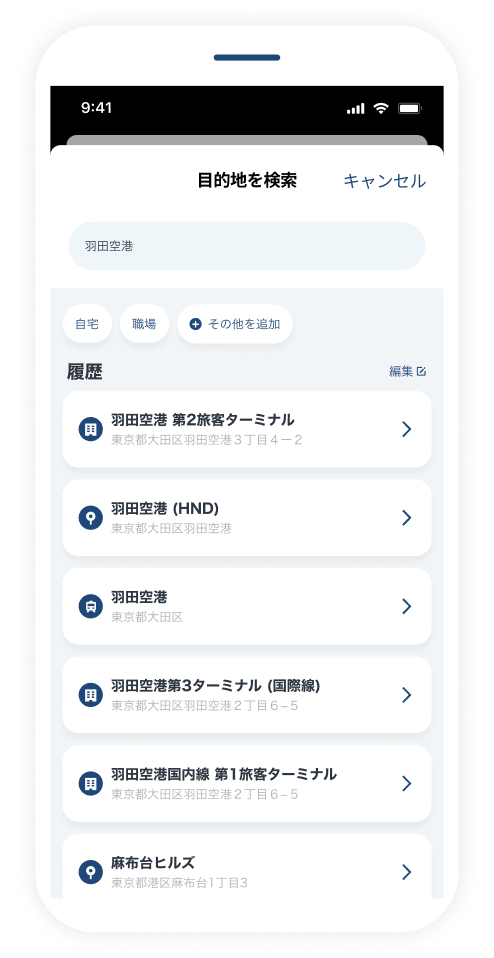
Specify the drop-off location.
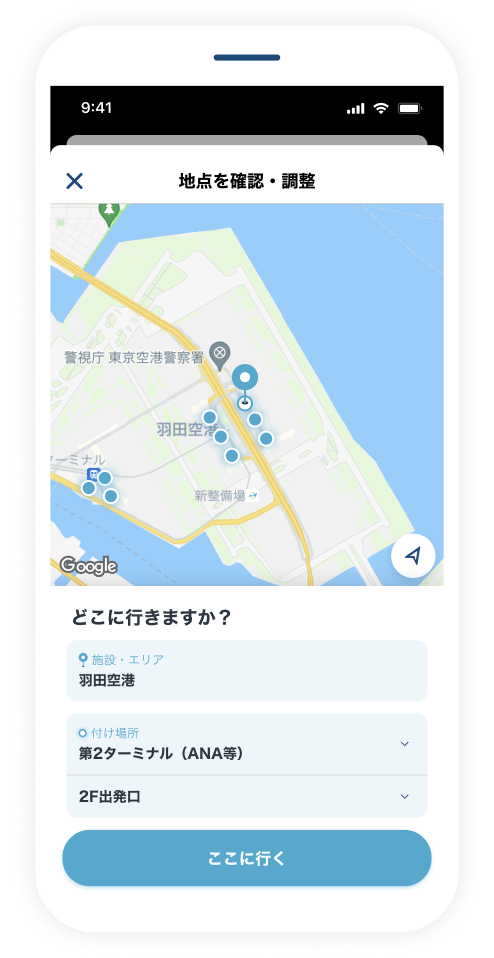
Select a spot from the displayed candidates.
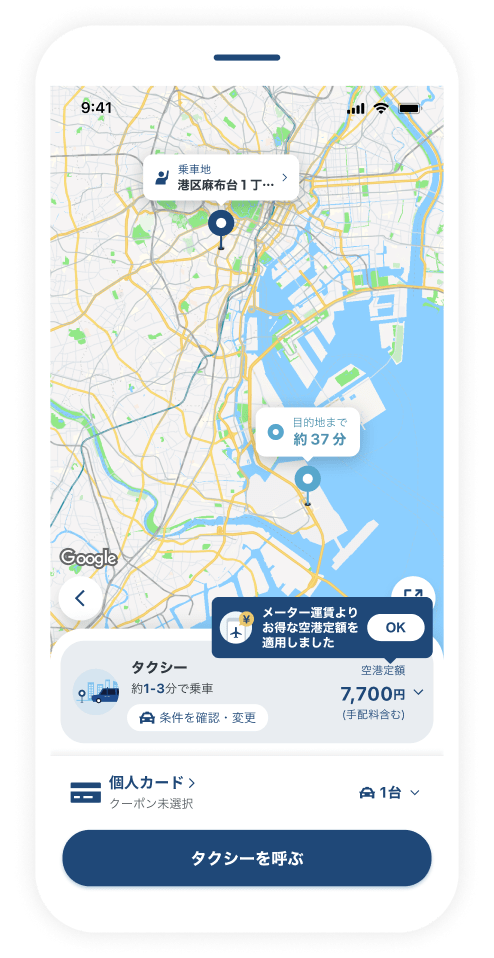
Confirm the displayed fixed fare and request a taxi.
Usage Fees
An Airport Flat Rate fee applies for the use of the Airport Flat Rate function. Fees vary by area and time slot, so please check the GO App when applying. The amount displayed for Airport Flat Rate includes the service charge. It does not include option fees such as Reservation or specific Opitions. If you use these services, you must pay for them separately. Also, if you use toll roads, a separate toll fare will be added. You can choose between the Airport Flat Rate and the regular fare even if the Airport Flat Rate is displayed.
Available Payment Methods
The service is only available when GO Pay is selected. It cannot be used with in-car payment.
FAQ
- What if the regular fare is cheaper than the Airport Flat Rate?
- If the regular fare is expected to be cheaper at the time of order, we will present the regular fare.
- Can I get a refund for the difference if I feel the Airport Flat Rate is higher than the regular order?
- We do not accept refunds.
- Can it be used in combination with Opitions?
- Yes. It can be used in combination. Reservation is only available for travel from the Tokyo area to the airport.
- Can I use it with in-car payment?
- No. This is a service exclusive to GO Pay.
- Can I use a coupon?
- Please note that coupons apply only to the taxi fare and do not apply to the service charge for this service.
- Why does the amount not match the meter fare?
- The taxi meter only displays the fare and fees, and does not include the service charge for this service. Please check the final payment amount from the usage history in the GO App.
- Where should I inquire about using the service?
- For inquiries regarding this service, please contact us through the GO App. Please note that this service is provided by us, and taxi companies cannot answer any questions.
Please check here for details.
GO PREMIUM
A service where you can specify and call a premium vehicle (*1). Just call with GO when you want to ride. It can be used casually for business use such as transporting special guests, movement on celebratory days, or daily travel when you want to move comfortably. We provide a Charter function that can be used for advanced booking or on an hourly basis in Chiyoda, Chuo, Minato, Shibuya, and Shinjuku wards of Tokyo (*2). Booking is possible from one week in advance up to one hour before the use, and fees will be charged according to the time. Please check here for details.
*1: Currently, the service is provided with ALPHARD or ELGRAND. We also offer Premium Sedan, where you can specify a sedan-type premium vehicle.
*2: Some areas are excluded. In Shinjuku and Shibuya, it is available in areas east of Meiji-dori. Premium Sedan is excluded.


Usage Flow
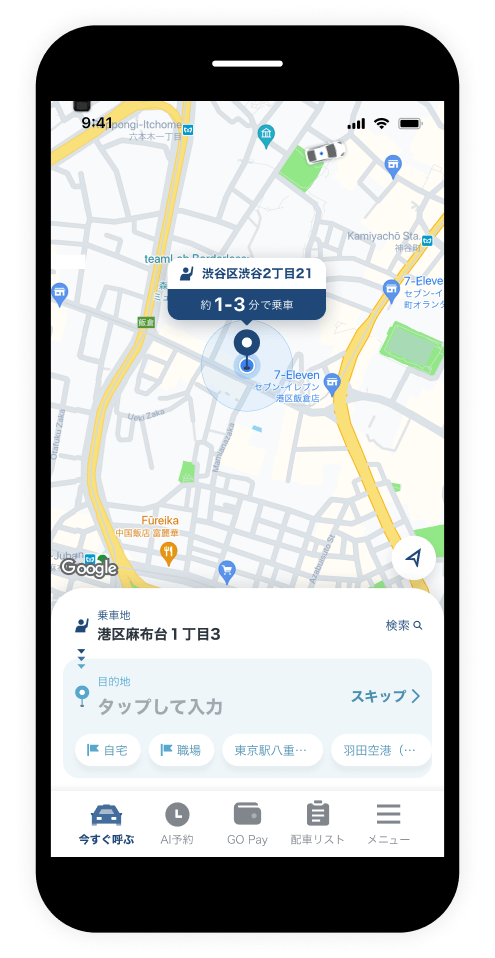
Specify the pickup location and drop-off location, then proceed to Next.
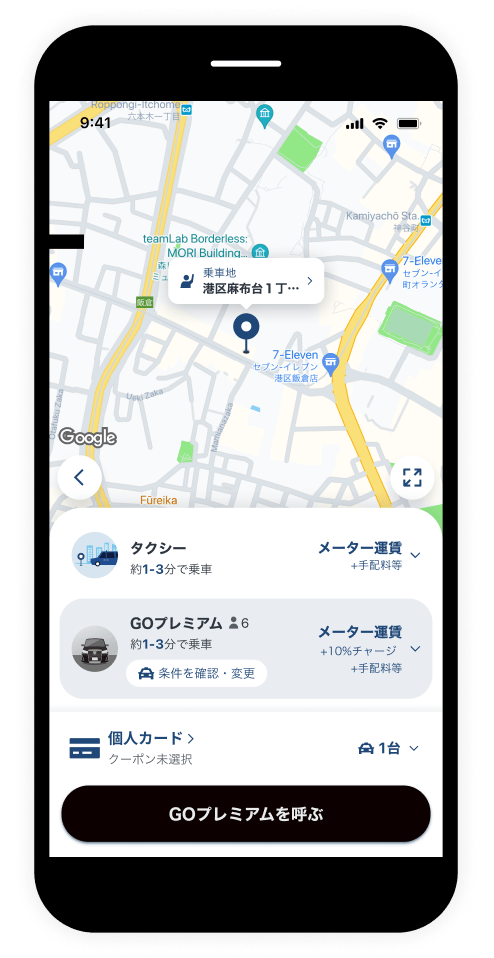
Specify a "Premium" vehicle and press "Call Premium."
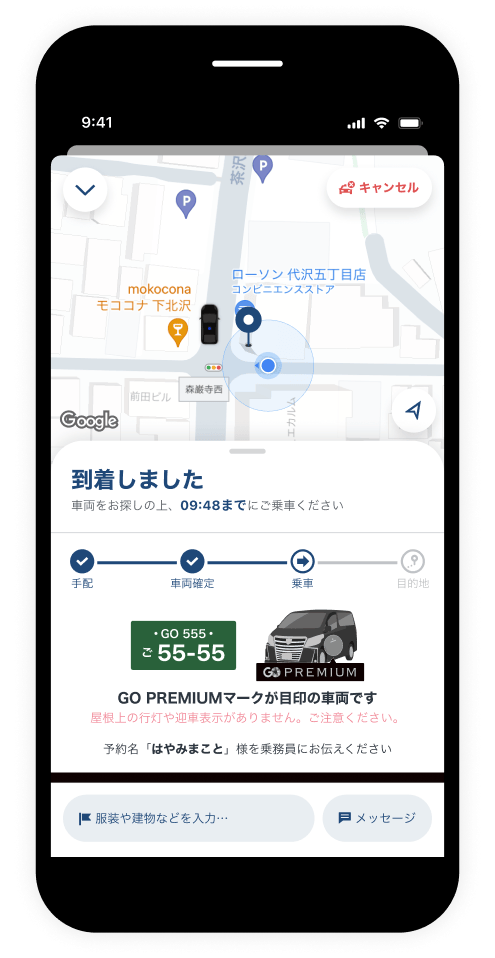
A premium vehicle will be arranged, and it will be displayed as a GO PREMIUM car.
Available Payment Methods
The service is only available when GO Pay is selected. It cannot be used with in-car payment.
Available Areas
Currently available for boarding from Chiyoda, Chuo, Minato, Shinjuku, Bunkyo, Meguro, Shibuya, Taito, Sumida, Koto, Shinagawa, Ota, Setagaya, Nakano, and Toshima in Tokyo, as well as Kita, Higashi, Naka, Chikusa, Showa, Mizuho, Tempaku, Atsuta, Nakagawa, Nakamura, and Nishi in Nagoya City, Aichi Prefecture. (Excluding some areas, expansion planned sequentially)
Usage Fees
In addition to the regular fare and pickup fee, a Premium charge applies. Fees vary by area and time slot, so please check the GO App when applying.
FAQ
- Can it be used in combination with Opitions?
- No. Opitions cannot be selected.
- Can I use it with in-car payment?
- No. This is a service exclusive to GO Pay. Also, please note that we cannot handle other payment methods even if you request them inside the car after ordering with GO Pay.
- Can I use a coupon?
- Yes, they are available for use.
- Why does the amount not match the meter fare?
- The taxi meter only displays the fare and fees, and does not include the service charge such as Premium charge for this service. Please check the final payment amount from the usage history in the GO App.
- Where should I inquire about using the service?
- For inquiries regarding this service, please contact us through the GO App. Please note that this service is provided by us, and taxi companies cannot answer any questions.
Please check here for details.
GO Reserve
GO Reserve is an app-only vehicle that only accepts orders from the GO App. Operated by a dedicated driver, GO Crew.

How is it different from a regular car?
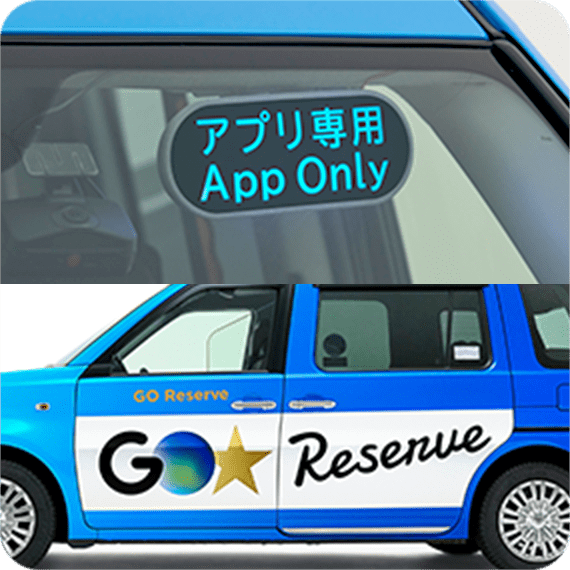
No taxi roof light or pickup sign
There is no taxi roof light (company mark) or pickup sign. Look for the GO Reserve mark on the side of the car and the app-only sign on the top front of the car.

Operated by dedicated drivers
Operated by GO Crew, dedicated drivers who have obtained a Class II license and completed training.
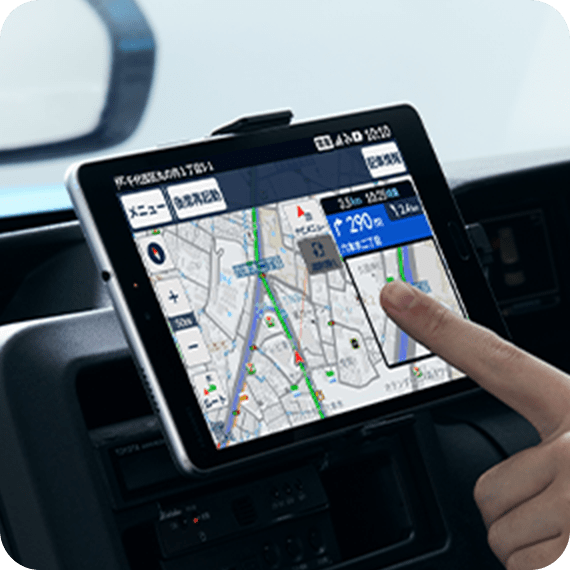
Driving according to navigation
Unless there are specific route instructions, the car will drive according to the car navigation. Please inform the driver if you have requests or wish to confirm the route.
Usage Flow
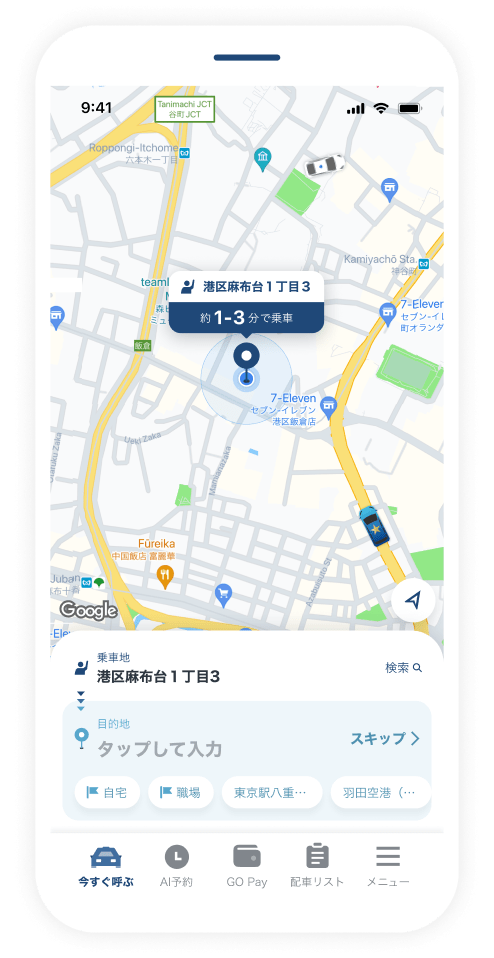
Set the pickup and drop-off location and press "Proceed to Next."
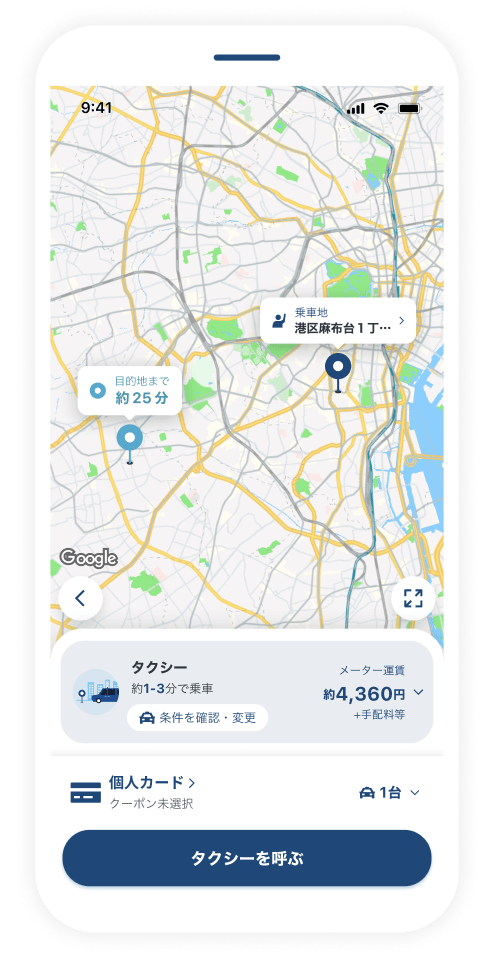
Specify "All taxi vehicles" and GO Pay (in-car payment not available) and press "request a taxi."
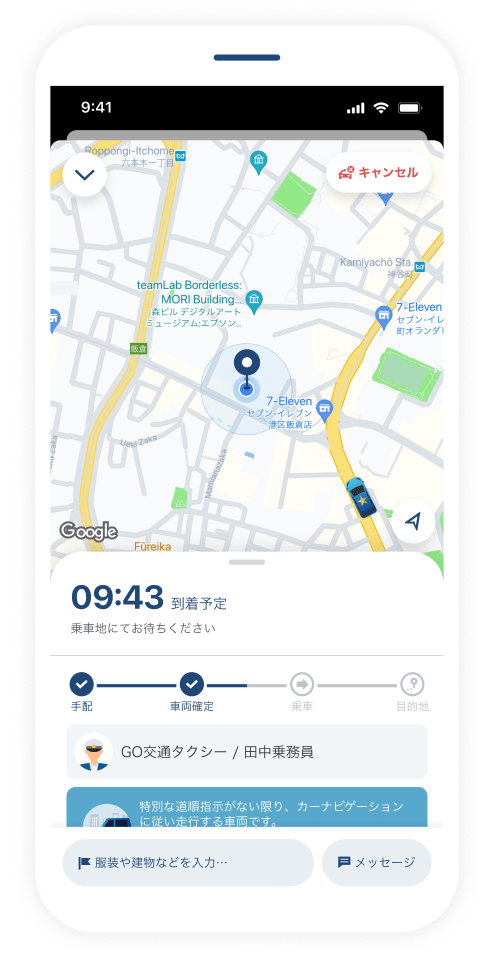
If a GO Reserve car is driving near the pickup and drop-off location, a GO Reserve car may come to pick you up.
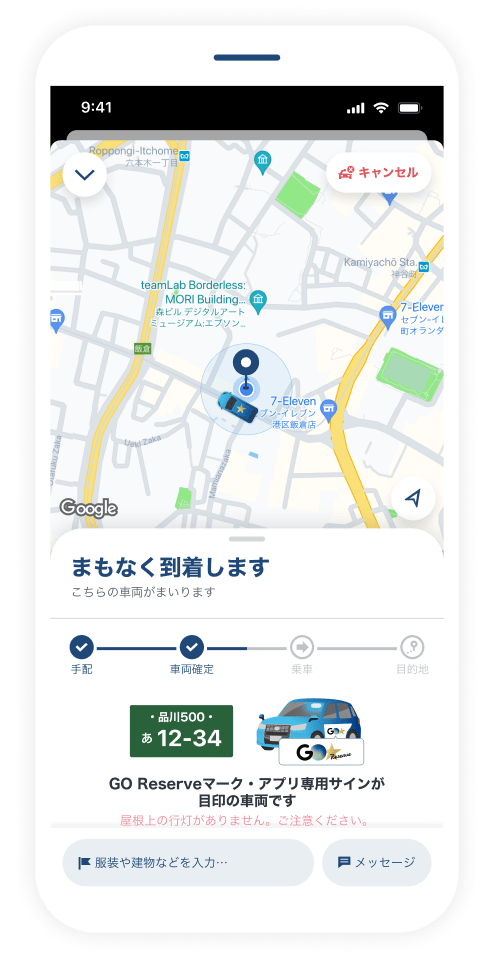
Look for the GO Reserve mark on the side of the car and the app-only sign on the top front of the car to confirm the vehicle and board.
Available Conditions
When you place an order that qualifies for a GO Reserve vehicle, a GO Reserve vehicle may come to pick you up.
・Drop-off location specified
・"All taxi companies" specified
・GO Pay specified (in-car payment not available)
*You cannot specifically request a GO Reserve vehicle.
Usage Fees
Same as regular taxi fees. *If using expressways, a separate ETC fee will be added.
FAQ
- Can I use it with in-car payment?
- No. This is a service exclusive to GO Pay. Also, please note that we cannot handle other payment methods even if you request them inside the car after ordering with GO Pay.
- Why does the amount not match the meter fare?
- The taxi meter only displays the fare and fees, and does not include the GO App charge. Please check the final payment amount from the usage history in the GO App.
Please check here for details.